 Known Issues
Common problems...
I don't see any traffic in Fiddler.
- Do you have an active VPN (or dialup modem) connection?
- Want to hook a non-IE browser or
application?
- Are you only trying to visit http://localhost?
- Do you have any traffic Filters enabled?
See the
Configuring clients
topic.
I don't see traffic sent to localhost
or 127.0.0.1.
See
Debugging Localhost,
or upgrade to IE9.
Some traffic seems to be missing?
See
Missing Traffic.
I get a System.NET.WebException "The underlying connection was closed" when
calling into WebServices.
When debugging a .Net application through
Fiddler, you may see a System.Net.WebException,
with message "The underlying connection was
closed: A connection that was expected to be kept alive was closed by the
server."
This is a bug in your application (it should handle this type
of exception).
Note: This problem is very unlikely in Fiddler 2.2.8.5
and later, due to enhanced client connection reuse support.
Sometimes Fiddler throws an out-of-memory exception?
Sometimes, Fiddler may
show a dialog containing the following text:
Exception of type 'System.OutOfMemoryException'
was thrown.
at System.IO.MemoryStream.set_Capacity(Int32 value)
at System.IO.MemoryStream.EnsureCapacity(Int32 value)
at System.IO.MemoryStream.Write(Byte[] buffer, Int32 offset, Int32 count)
at Fiddler.Session.Execute(Object objThreadstate)
Fiddler works by storing the entire request and response in memory.
If you are performing a huge download (hundreds of megabytes) it's
possible that Fiddler cannot find a free memory block large enough to hold the
entire contiguous response, and hence you'll run into this "out of memory"
problem. It's also possible that if
you have thousands of sessions in the Fiddler session list, even a relatively
small memory block will not be available to store a response a few megabytes in
size. You can reduce the incidence of this problem by clearing the
Web Sessions
list (CTRL+X) or configuring it to automatically trim to the most recent two
hundred sessions (Click the Filters tab, and click the "Keep only the most
recent sessions" option at the bottom).
Developers can learn more
about this here:
http://blogs.msdn.com/ericlippert/archive/2009/06/08/out-of-memory-does-not-refer-to-physical-memory.aspx
and here
http://blogs.msdn.com/b/dotnet/archive/2011/10/04/large-object-heap-improvements-in-net-4-5.aspx.
Update: Fiddler2 now supports
running on 64bit computers. If you're on a 64-bit machine, you'll never
hit a problem.
If you're on a 32-bit machine, you can avoid
out-of-memory errors when downloading huge files by adding the following
code inside the OnPeekAtResponseHeaders function inside
Rules > Customize Rules. The line in red will cause Fiddler not to keep a
copy of the large file:
// This block enables
streaming for files larger than 5mb
if
(oSession.oResponse.headers.Exists("Content-Length"))
{
var
sLen = oSession.oResponse["Content-Length"];
var iLen: Int32 =
0;
if (!isNaN(sLen)){
iLen =
parseInt(sLen);
if (iLen > 5120000) {
oSession.bBufferResponse = false;
oSession["ui-color"] = "yellow";
oSession["log-drop-response-body"] = "save memory";
}
}
}
If you're using FiddlerCore or writing a Fiddler
Extension, you can use code like this:
Fiddler.FiddlerApplication.ResponseHeadersAvailable
+= delegate(Fiddler.Session
oS)
{
// This block enables streaming for files larger
than 5mb
if (oS.oResponse.headers.Exists("Content-Length"))
{
int iLen = 0;
if (int.TryParse(oS.oResponse["Content-Length"],
out iLen))
{
// File larger than 5mb? Don't save its content
if (iLen > 5000000)
{
oS.bBufferResponse = false;
oS["log-drop-response-body"] =
"save memory";
}
}
}
};
I get certificate errors or .NET security exceptions when debugging with
Fiddler2.
Fiddler2 relies on a "man-in-the-middle" approach to HTTPS
interception. To your web browser, Fiddler2 claims to be the secure web
server, and to the web server, Fiddler2 mimics the web browser. In order
to pretend to be the web server, Fiddler2 dynamically generates a HTTPS
certificate chained to its own root certificate.
The Fiddler root certificate is not trusted by your
application (since Fiddler is not a Trusted Root Certification authority), and
hence while Fiddler2 is intercepting your traffic, you'll see a HTTPS error
message in your browser or receive a security exception in your .NET client
application. You can reconfigure Windows to trust
Fiddler's
bogus root to avoid error messages and enable logon to services like Passport
and .NET Web Services. Note that you should never make this configuration change on a
non-Test machine.
See the
Decrypting HTTPS traffic with Fiddler2 for information on resolving this
issue.
Fiddler's "Automatic Authentication" feature doesn't work when server
and client are on the same machine?
If IIS and the client are on the same machine, then a
feature called "Loopback protection" is causing the
authentication request to fail because your computer recognizes that it is
authenticating to itself, and it is unexpected (due to the proxy). You'll need to set DisableLoopbackCheck=1
as described here:
http://support.microsoft.com/kb/926642
Fiddler crashes on
startup complaining about the Tahoma font
---------------------------
Sorry, you may have
found a bug...
---------------------------
Fiddler has encountered
an unexpected problem.
Font 'Tahoma' does not support style
'Regular'.
Source: System.Drawing
at
System.Drawing.Font.CreateNativeFont()
This can happen if you have the Microsoft Word 97 viewer
installed. That tool sets the registry key
HKEY_LOCAL_MACHINE\SOFTWARE\Microsoft\Windows
NT\CurrentVersion\Fonts\Tahoma (TrueType) to tahoma.FOT.
To fix the issue, change the following registry key from:
HKEY_LOCAL_MACHINE\SOFTWARE\Microsoft\Windows NT\CurrentVersion\Fonts
"Tahoma (TrueType)"="tahoma.FOT"
to
HKEY_LOCAL_MACHINE\SOFTWARE\Microsoft\Windows NT\CurrentVersion\Fonts
"Tahoma (TrueType)"="TAHOMA.TTF"
If that does not help, you may be missing the Tahoma font on
your computer (it should be in c:\windows\fonts), or the .NET Framework
installation is corrupt. If you see the Font file, then try reinstalling
the .NET Framework and all updates from WindowsUpdate.
Fiddler crashes on
startup complaining about the "Configuration System"
---------------------------
Sorry, you may have found a bug...
---------------------------
Fiddler has encountered an unexpected problem. If you
believe this is a bug in Fiddler, please copy this message by hitting
CTRL+C, and submit a bug report using the Help | Send Feedback menu.
Configuration system failed to initialize
Source: System.Configuration
at
System.Configuration.ConfigurationManager.PrepareConfigSystem()
at
System.Configuration.ConfigurationManager.GetSection(String sectionName)
System.Configuration.ConfigurationErrorsException: Unrecognized
configuration section system.serviceModel.
(c:\WINDOWS\Microsoft.NET\Framework\v2.0.50727\Config\machine.config line
134)
or
System.Configuration.ConfigurationErrorsException: Unrecognized configuration section runtime. (C:\Program Files (x86)\Fiddler2\Fiddler.exe.Config line 2)
This error message indicates that one of the .NET
Framework's configuration files is corrupt. The most common fix for this
is to visit WindowsUpdate and install all available .NET Framework
updates. If that doesn't work, try re-installing the .NET Framework. If
that doesn't work, try editing the file specified in the error message to
correct whatever the error message is complaining about.
Fiddler Crashes on Startup with an unhelpful message box
If you see this message box when starting Fiddler:
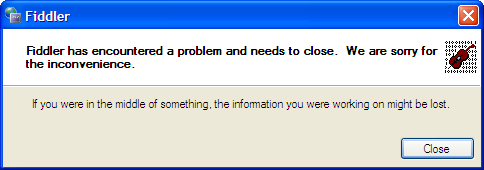
...it generally means that your .NET Framework installation
is corrupt. If you uninstall and reinstall the .NET 2.0 Framework,
the problem is usually resolved.
Obscure problems...
- If you're seeing incomplete HTTP Responses, ensure "Use HTTP1.1 through
proxy servers" is checked on IE's Tools | Internet Option | Advanced tab.
(Or in your browser of choice).
When connecting to http://localhost on a
WindowsXP version of IIS, you may see many HTTP/403
errors. This is caused by WindowsXP's 10 connection limit. To
reduce the incidence of this problem, ensure that "Reuse Connections to
Servers" is checked in the Tools | Fiddler Options |
Connections dialog.
Microsoft ISA Firewall client may cause Fiddler to detach.
Learn more.
When starting Fiddler under nonadmin
account (ordinary User) you may see an error message:
Unable to bind to port [Localhost: 8888]. This is usually due to another
running copy of Fiddler.
(An attempt was made to access a socket in a way forbidden by its access
permissions)
Fix:
Close Fiddler.
Using REGEDIT, add a new STRING under
HKCU\Software\Microsoft\Fiddler2
named ExclusivePort with value False
Other problems?
Got a problem not listed above? Use the "Contact" link to send me mail.
Thanks!
< Back to Help Homepage
©2013 Telerik
| 
 Get the NEW book!