 Fiddler's Streaming Mode
Introduction
By default, Fiddler operates in Buffering Mode for most responses. In Buffering
Mode, Fiddler buffers HTTP(S) responses completely before returning them
to the client. This gives the Fiddler user the opportunity to modify the response before the client
receives it.
What is streaming mode?
When in streaming mode, Fiddler will return response bytes to
the client immediately, as it reads them from the remote server. This is
primarily important for low-level network timing scenarios, because most web
browsers (Internet Explorer, Firefox, etc) will parse partially-downloaded HTML
pages and begin downloading needed resources (e.g. CSS, JS, etc) in parallel,
even before the remote server has finished delivering the HTML. In some
cases, this leads to a measurable performance improvement.
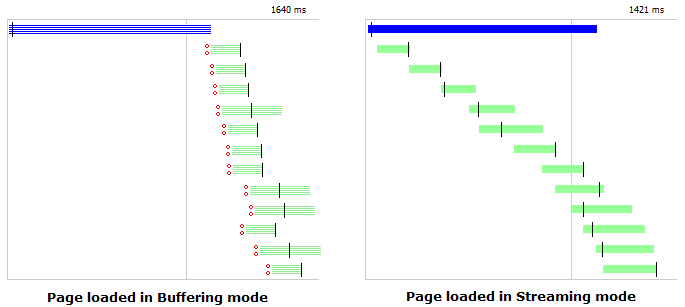
Streaming mode is also useful in some other cases,
particularly when visiting Internet Radio sites that deliver a never-ending stream
of MP3 data. An audio stream, by definition, is never complete,
so Fiddler's attempt to buffer it completely will always fail.
Automatic Streaming Mode
Fiddler will automatically stream responses of video/* or
audio/* types. You can control this option by clicking Tools | Fiddler
Options, then unchecking the "Automatically stream audio and video" option at
the bottom of the list.
Enabling Streaming Mode
You can configure Fiddler to stream all HTTP(S)
responses. Simply click the
"Streaming" button in the Fiddler toolbar:

Alternatively, you can enable streaming on a per-session basis
by setting the bBufferResponse property to false
on the Session object. Note that you must set this property in
FiddlerScript's OnBeforeRequest handler or
IFiddlerExtension's
IAutoTamper.AutoTamperRequestBefore or
IAutoTamper.AutoTamperRequestAfter handler.
Session handling in Streaming Mode
For sessions in streaming mode, response breakpoints will not
be triggered, and changes to the response headers or body will not be seen by
the client.
Note to Extension Developers: IAutoTamper::AutoTamperResponseBefore is
the last event that fires on a streamed session, after the response data has
already been returned to the client.
Note to FiddlerCore
Developers:When the
bBufferResponse
property on a session is set to
false,
that session's response is streamed to the client
as it is being read from the server. As a
consequence, the client has already received the
response before the
BeforeResponse
event has fired.
In contrast, if that property is set to
true, that
Session's response will be buffered until complete,
then the
BeforeResponse event fires, then the
response is sent to the client.
The last event guaranteed to fire before the
client starts getting response bytes is
FiddlerApplication.ResponseHeadersAvailable.
You can use that event
handler to set the
bBufferResponse property if you need to modify
the response bytes before the client receives them.
< Back to Help Homepage
©2018 Eric Lawrence
| 
 Get the NEW book!
 Get Fiddler!